The Seestar S50 is a smart astronomical telescope; more specifically a smart telescope, designed and manufactured by ZWO.
Incidentally, I'll be doing a live webinar (presentation/review) on The Seestar S50 and The Dwarf II smart telescope; as well as Astronomy in general, for The BatAbility Club! On December 11th!
This is really unique and marvelous! I'll be doing my best to present amatuer astronomy, and smart telescope astrophotography to the club members; who are all experienced bat and/or wildlife professionals.
As always, it will be viewable to Club Members only (you might consider becoming a Member!).

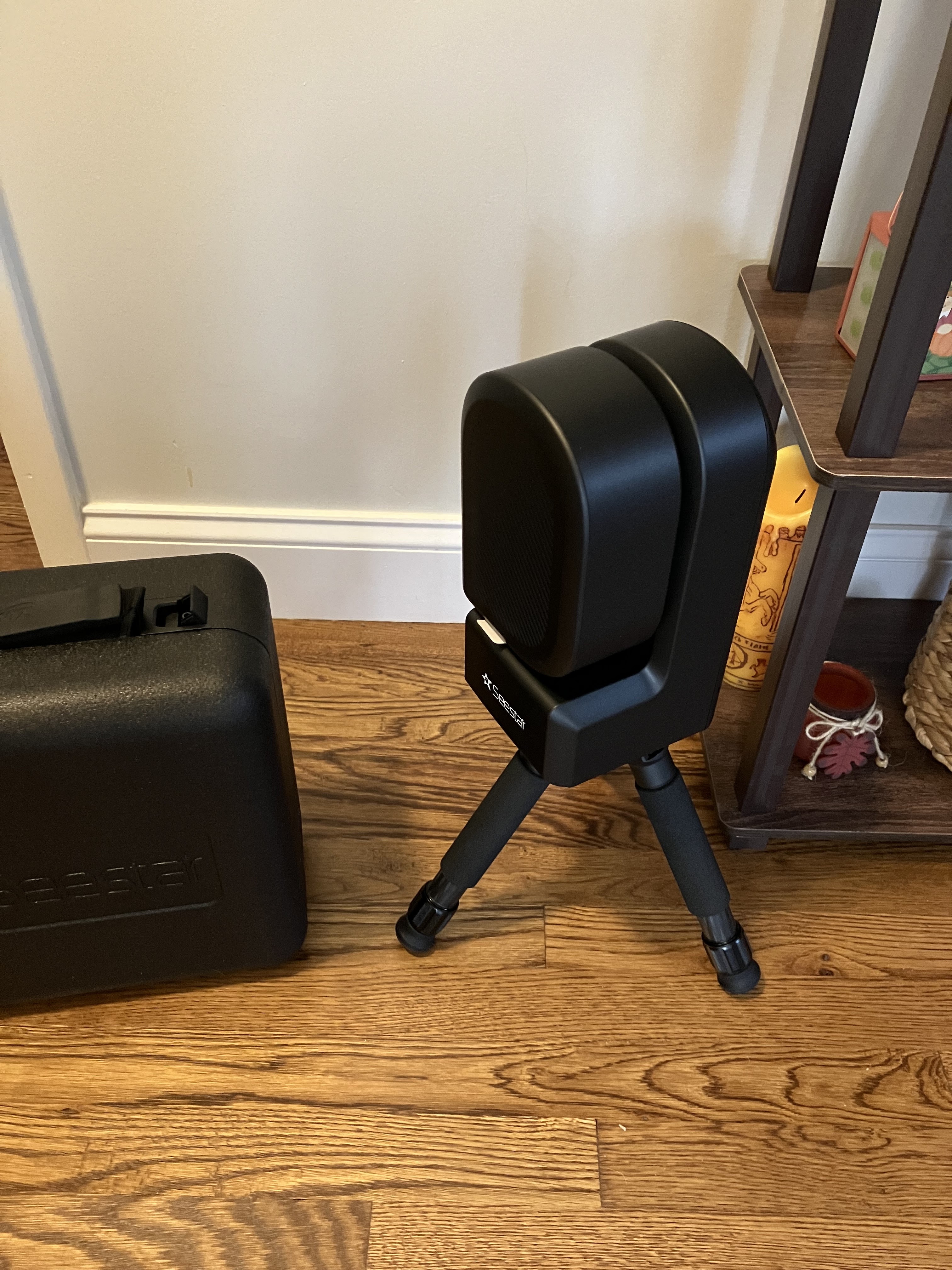
This is where the FedEx delivery guy left the box for me – right next to the carbon fiber tripod I was using the night before 😀
The Seestar S50 weighs only 2.5kg, the tripod is only 0.65kg, and the carry case is 0.6kg.
The Seestar S50 can be ordered directly from ZWO, right from their webpage, dedicated to the Seestar S50. It may also be ordered from many different telescope dealers online - So you can try some of the places where you normally order your telescope/astronomy equipment from.

The Seestar S50 shares many features with other smart telescopes, such as:
- It's small and compact.
- It's controlled by your smartphone (or tablet) / Android or iPhone based.
- Object GOTO ability / and Automatic star tracking.
- Automatic stacking of your images from space.
- Ability to do daytime photography (and video).
- Comes with built in rechargeable battery. For comparison, The Dwarf II's (rechargeable) batteries are removable.
Additional technical specifications include:
- A resolution of 2.1 Megapixels
- Pixel size of 2.9um
- A 50mm apochromatic lens aperture, @F/5
- A 250mm focal length refractor
- Utilizing a Sony IMX462 sensor chip


The Seestar S50 in its carry case.

I am almost reluctant to describe how easy it is to use this smart telescope. Simply because sometimes, if something is very easy to use, it may not be taken as seriously as it should. Many people have a tendency to equate complexity, and difficulty of use, with something that is comprehensive and effective.
So there’s a bit of a paradox here, the Seestar S50 is indeed very easy to use, however, the results it produces are very impressive:

NGC 7789 - Also known as Caroline‘s Rose named after Caroline Herschel (William Herschel‘s sister)


I happen to like the blue Seestar banner on the bottom of the resulting photos. The Seestar S50's operating software is very advanced.
When it comes to who I would recommend this product for, the answer is: Anyone! Anyone, ranging in age from a (patient) teenager to someone of advanced age. Why?
Because operating the Seestar S50 couldn’t be any simpler – It only requires the main unit to be attached to the included tripod. The tripod legs opened, and the telescope placed on a flat, level surface.
After which, you power the unit on - by holding and pressing the power button for a few seconds. The unit powers on with an audible beep, and the red and amber LEDs illuminate, indicating that the unit is powered on.
The only section which may require a bit of dexterity (or "skill"), is the navigation of the Seestar software. This software is an astronomy/planetarium-like application.
I may be going out on a limb here, but if a person already has an interest in astronomy, there’s a very good chance, that they will feel at home, navigating this easy to use software. I've found the software to be very intuitive to use.
The only thing required of the end-user, in essence, is to simply select what celestial objects they would like to have the Seestar S50 photograph. I hardly think that the entire system could possibly be made any easier to use.
The Seestar S50 smart telescope, would be well suited for anyone who enjoys, or is interested in the night sky.
It would be fitting for anyone, ranging from being simply intrigued by the night sky, and especially deep sky objects – to someone who always wanted to take photographs of deep sky objects, but wasn't sure how they'd begin.
This runs the gamut to someone who has previously tried Widefield Astrophotography, or conventional Astrophotography.
This smart telescope would be well suited for anyone who is fascinated with the subject of astronomy. It would be well-suited for anyone who has owned a telescope in the past, and has dabbled in the hobby of amateur astronomy.
This smart telescope would be well suited for anyone who is fascinated with the subject of astronomy. It would be well-suited for anyone who has owned a telescope in the past, and has dabbled in the hobby of amateur astronomy.
I contend that those who have enjoyed conventional Astrophotography in the past, will really be blown away by both its simplicity and raw capability. And by this, I’m referring to the outstanding results which this unit produces.


M27 - The Dumbbell Nebula
(Some minor post processing)

M13 - The Hercules Star Cluster
(cropped and post processed)

NGC 7635 - Also known as The Bubble Nebula
(only very minor post processing)
The following, could be considered my version of a Quick Start guide:
(although there's nothing wrong with the one provided)
- Open the case, remove the Seestar S50 unit and plug it in via the provided USB cable, to begin charging it’s internal battery.
- While waiting for the unit to charge, you can download and install the Seestar software on your smart phone.
- When the unit is fully charged, as indicated by the red LEDs, it’s ready to begin taking images of objects in the night sky.
- Again, the Seestar S50 excels at capturing images of deep sky objects (referred to as DSO’s).
- You launch the smart phone app, connect to the Seestar S50 (This is via Wi-Fi) and you’re ready to select your first object to begin imaging.
No, I didn’t forget anything - those are all the steps.
Things like Polar alignment. Something which is a must, when doing conventional astrophotography don’t exist when using The Seestar S50.
Many astrophotographers (myself included) are not fond of polar aligning a set-up. Depending on your equipment, it can be quite annoying. As evidenced by the existence of so many funny memes on the subject!
Things like:
- (1.) Polar alignment - Not only is it not needed, but it cannot even be done!
- (2.) Having to take Calibration frames: Darks, Biases, and Flat frames - again, not required, and also not possible (practically speaking).
- (3.) Having an autoguider to purchase, and then worry about.
- (4.) Having to wait until the next day (typically) to sort through, organize, and stack your frames.
- (5.) Stacking and post-processing "your data" - this necessitates being in front of a computer screen, for substantial lengths of time (always my least favourite part).
I found the GoTo system and pointing (finding) accuracy to be excellent!

Pros:
- Requires almost zero prior knowledge of astrophotography.
- Features an intuitive planetarium-like software, enabling the user to explore & select objects to photograph.
- Is rated to continue operating down to a temperature of -15℃
- Has a built-in dew heater, which is easily turned on & off (via phone).
- Features a built-in Duo Band nebula filter (which is amazing!).
- It may be used to photograph the Sun, utilising the (included) Solar Filter.
- It may also be used for daytime/terrestrial (wildlife) photography.
- The software gives you the ability, to easily join a worldwide network of S50 owners: Enabling you to share your "works" and "Like" other's. Like a "Facebook for astrophotographers" - Neat!
Cons:
- Cannot enter Right ascension / Declination coordinates (for unlisted objects).
- Exposures are "locked-in" at 10 seconds each (end user cannot [currently] modify).
- Lower Megapixel resolution than The Dwarf II (2.xMP vs 8.xMP on Dwarf II).
- There is currently a bit of a wait, after you order a Seestar S50 (they are still catching up on back orders, etc.). The Dwarf II may be had without delay.
I have a feeling I'll be revisiting the subject of smart telescopes on this blog again, in the near future. Believe it or not, there are some fundamental (yet simultaneously amazing) topics, which may still need to be discussed:
Like how these smart telescopes are changing the way many people enjoy the hobby of amatuer astronomy now... Astrophotography, to be more specific.
Until next time,
Until next time,
Clear skies!


.jpg)


